PyMuPDF4LLM vs pdfplumber vs Marker, Tested on Real PDFs
By pdftomd.tools team · Updated · 8 min read
Short answer from our tests: pymupdf4llm is the best default, fast and with the cleanest headings, if its AGPL licence suits you. pdfplumber, under MIT, is the most exact on ruled tables but gives you no headings. marker handles borderless tables best and strips page clutter, but on a CPU it is several times slower and it damaged our Chinese text. For one-off files, our Python PDF to Markdown guide also covers a no-install route.
PyMuPDF4LLM vs pdfplumber vs Marker: the verdict
| If you need | Pick | Why |
|---|---|---|
| Good Markdown fast, headings included | pymupdf4llm | All expected headings at the right level on all three documents |
| Exact cells from ruled tables, permissive licence | pdfplumber | Exact on ruled and merged-cell grids; MIT licence |
| Borderless tables, no running headers | marker | Found both simple borderless samples; removed headers and page numbers |
| Chinese or Japanese text | pymupdf4llm | Full character coverage and punctuation kept; marker lost characters |
No library won every test. The rest of this article shows the numbers behind each line, so you can weigh pymupdf4llm vs pdfplumber vs marker against the PDFs you actually have.
How we tested: hardware, versions, documents
To make pymupdf4llm vs pdfplumber vs marker a fair comparison, every library got the same files on the same machine. All runs were CPU only pdf parsing: Intel(R) Xeon(R) Processor, 8 vCPUs, 16 GB RAM, no GPU, Linux 6.12.94+ x86_64, Python 3.13.5. Versions: pymupdf4llm 1.28.2 (PyMuPDF 1.28.2), pdfplumber 0.11.9 (pdfminer.six 20251230), marker-pdf 2.0.0 (surya-ocr 0.22.1, torch 2.14.1+cpu). Tokens were counted with tiktoken 0.14.0 and the o200k_base encoding. We ran the test on October 19, 2026.
- Documents: a 5-page English guide with 13 headings and a table; an 11-page Chinese report with 29 headings and 4 tables; a 4-page English report with a running header and page numbers on every page.
- Table samples: 11 one-page PDFs whose correct tables we know cell by cell, including two with no table at all.
- Settings: each library’s defaults. pdfplumber has no Markdown output, so we wrote about 20 lines that place its text lines and
find_tables()results in reading order. marker ran once with defaults (fast mode, which is its CPU default) and once with--disable_ocr. - Timing: the median of three runs. marker’s models were loaded once beforehand (4.79 seconds) and a warm-up run was discarded.
import pymupdf4llm
md = pymupdf4llm.to_markdown("report.pdf")

import pdfplumber
with pdfplumber.open("report.pdf") as pdf:
    for page in pdf.pages:
        lines = page.extract_text_lines()
        tables = page.find_tables()

from marker.converters.pdf import PdfConverter
from marker.models import create_model_dict
from marker.output import text_from_rendered
converter = PdfConverter(artifact_dict=create_model_dict())
md, _, _ = text_from_rendered(converter("report.pdf"))On a CPU, marker 2.0 also needs a llama-server binary from llama.cpp, which its README asks you to install separately, and on first use it downloaded about 1.8 GB of model files on our box. Our first two attempts failed: once on a torch/torchvision mismatch, once because llama-server was missing. Both were setup problems, not bugs in the library, but budget time for them.
Speed and token counts
| Library | English guide (5 p.) | Chinese report (11 p.) | English report with running headers (4 p.) | Tokens, Chinese report |
|---|---|---|---|---|
| pymupdf4llm | 0.693 s | 1.419 s | 0.387 s | 8908 |
| pdfplumber | 0.713 s | 3.579 s | 0.023 s | 8782 |
| marker (default) | 3.354 s | 4.563 s | 2.325 s | 10001 |
| marker (--disable_ocr) | 1.425 s | 3.146 s | 0.447 s | 10001 |
Speed is where pymupdf4llm vs pdfplumber vs marker differs most. pdfplumber was the fastest on the short report (0.023 s) but the slowest of the light tools on the Chinese one. pymupdf4llm stayed between about 0.1 and 0.14 seconds a page throughout. marker was 5 times slower than pymupdf4llm on the English guide even with its models already loaded; with --disable_ocr the gap shrank.
Token counts were close for the two light libraries. marker produced about 12% more tokens on the Chinese report, partly from <sup> tags and extra spacing, and fewer on the short report, because it dropped the repeated headers.
Headings and page clutter
| Library | English guide (13) | Chinese report (29) | English report with running headers (4) |
|---|---|---|---|
| pymupdf4llm | 13 (13 right level) | 29 (29 right level) | 4 (4 right level) |
| pdfplumber | 0 (0 right level) | 0 (0 right level) | 0 (0 right level) |
| marker (default) | 11 (4 right level) | 23 (14 right level) | 4 (3 right level) |
| marker (--disable_ocr) | 11 (4 right level) | 23 (14 right level) | 4 (3 right level) |
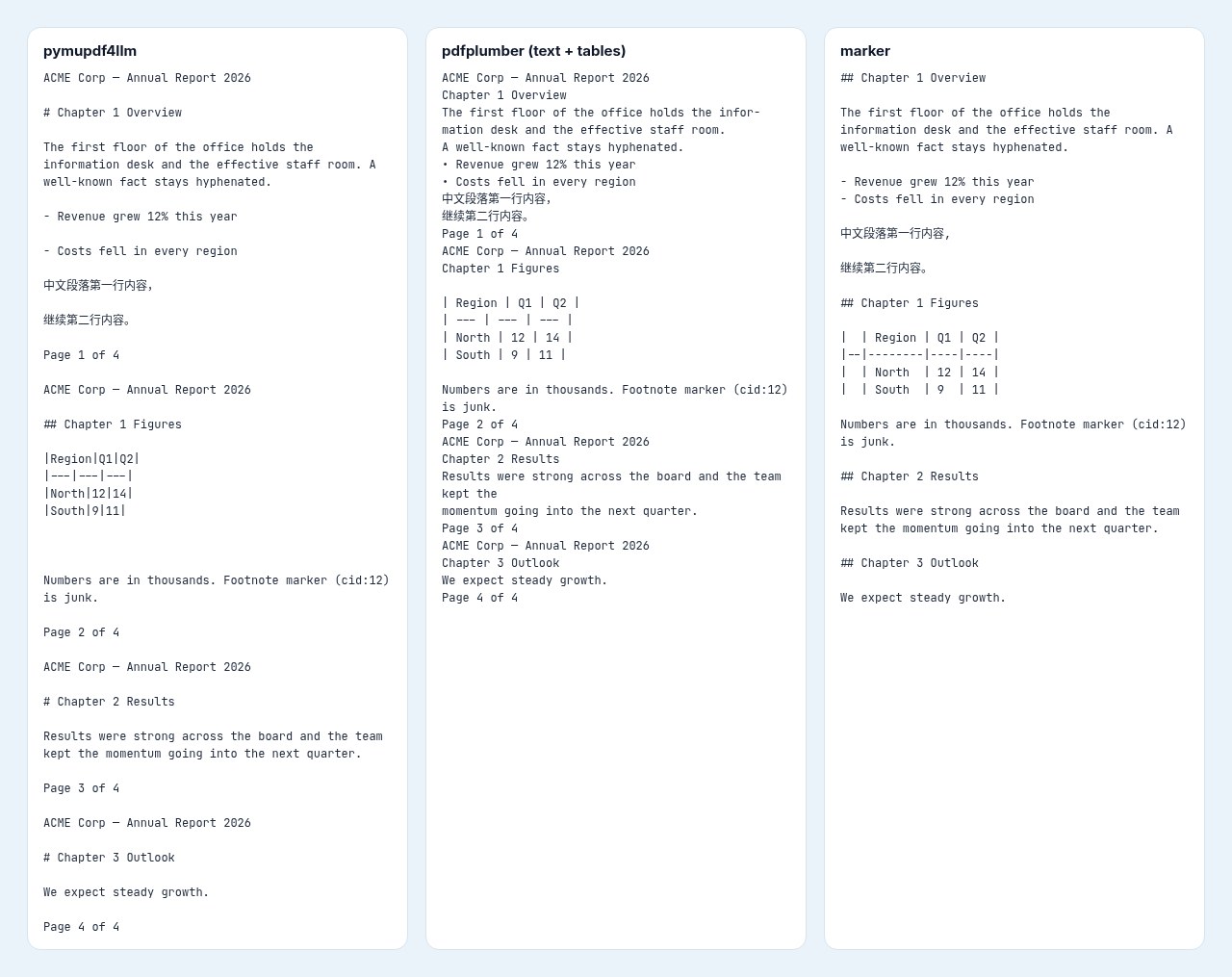
Headings are the second big split in pymupdf4llm vs pdfplumber vs marker. pymupdf4llm found every heading at the right level. It also marked the guide’s bold FAQ questions as headings (6 lines), which is arguably useful. pdfplumber has no notion of headings, so you get flat text. marker found most headings but often at the wrong level.
On the 4-page report, pymupdf4llm and pdfplumber both kept all 4 copies of the running header and all 4 page numbers; marker removed both. This is the clearest case for pymupdf4llm vs marker: marker’s layout model knows what a page header is, the light libraries do not. pdfplumber also left a word split by a line-end hyphen.
Tables: ruled, borderless, merged
| Sample | pymupdf4llm | pdfplumber | marker |
|---|---|---|---|
| Ruled grid | exact | exact | exact |
| Office export | 81% of cells | exact | 94% of cells |
| Borderless | 40% of cells | not found | 90% of cells |
| Wrapped cells | exact | exact | 83% of cells |
| Borderless, wrapped | not found | not found | 83% of cells |
| Office, borderless | not found | not found | not found |
| Table inside text | exact | not found | exact |
| Two tables | exact | 33% of cells | exact |
| Merged cells | 83% of cells | exact | 42% of cells |
On tables, the ranking of pymupdf4llm vs pdfplumber vs marker depends on whether the PDF draws lines. pdfplumber tables are exact when the PDF draws its grid lines, including merged cells, because find_tables() follows the ruling. Without lines it found nothing. pymupdf4llm was exact on most ruled tables, but broke one Office table where a cell contained a | it did not escape. marker found both simple borderless samples, at 83–90% of cells, where pymupdf4llm found one at 40% and pdfplumber found neither; but marker merged columns in the merged-cell sample.
No library got the borderless table from an Office export. If tables are what you need, our PDF tables guide explains why borderless layouts are hard for every tool.
Chinese text: coverage, spaces, punctuation
| Library | Chinese characters kept | Spaces inside sentences | Line breaks inside sentences | Full-width commas kept |
|---|---|---|---|---|
| pymupdf4llm | 100% | 159 | 0 | 100% |
| pdfplumber | 100% | 0 | 140 | 100% |
| marker (default) | 98.6% | 166 | 0 | 0% |
Chinese text reorders pymupdf4llm vs pdfplumber vs marker once more. The source PDF has no spaces inside its sentences. pymupdf4llm kept every character and every full-width comma, but added 159 spaces inside sentences. pdfplumber kept the characters too, but left 140 line breaks in the middle of sentences. marker lost 1.4% of the characters, including some section headings, turned every full-width comma into an ASCII comma, and added 152 <sup> tags. For Chinese PDFs, the marker pdf output needed the most repair in our tests.
Licences: AGPL vs MIT vs Apache, plus model terms

- pdfplumber: MIT, per its LICENSE file. Use it in closed-source and commercial code with the notice kept.
- pymupdf4llm and PyMuPDF: the repositories ship the GNU AGPL 3.0, and the package metadata says “Dual Licensed - GNU AFFERO GPL 3.0 or Artifex Commercial License”. In short, if you distribute a program built on it, or let users reach a modified version over a network, the AGPL expects you to share that program’s source under the same licence, unless you buy a commercial licence from Artifex.
- marker: the code is Apache-2.0, but the model weights use a modified AI Pubs Open RAIL-M licence. Per its MODEL_LICENSE, the weights are free for research, personal use and organisations under $5M in gross revenue or funding; above that you need a licence from Datalab.
If licensing decides pymupdf4llm vs pdfplumber vs marker for you, AGPL vs MIT is the real choice for most commercial teams between the two light libraries, and marker adds a revenue test. This is a summary, not legal advice; read the licence files before you ship.
Sources
- PyMuPDF4LLM documentation — Artifex
- pymupdf4llm repository and licence — GitHub
- pdfplumber README and LICENSE.txt — GitHub
- marker README, LICENSE and MODEL_LICENSE — GitHub (Datalab)
- GNU Affero General Public License v3.0 — Free Software Foundation
- tiktoken — GitHub (OpenAI)
FAQ
Which is best: pymupdf4llm vs pdfplumber vs marker?
In our tests, pymupdf4llm for general documents and Chinese text, pdfplumber for exact ruled tables under MIT, and marker for borderless tables and pages with running headers.
Is pymupdf4llm free for commercial use?
Under the AGPL, yes, if you also release your source when you distribute or serve the program. Otherwise Artifex sells a commercial licence.
Does marker need a GPU?
No. It ran on our 8-vCPU box with no GPU, but it needed llama.cpp’s llama-server and was several times slower than the light libraries.
Can pdfplumber output Markdown?
Not directly. It gives you text, words, lines and tables; you write the Markdown yourself, as we did for this test.
Which library handles scanned PDFs?
marker is the one built around OCR models. With their default settings, pymupdf4llm and pdfplumber read the text layer, so a scan comes out empty.
Can I reproduce this pymupdf4llm vs pdfplumber vs marker test?
Yes. The script, the versions and the hardware are listed above; timings will differ on another machine, while the quality scores should not.